
Reducing RAG Costs with Amazon S3 Vectors: When It Fits—and When It Doesn’t
A practical architecture guide to using Amazon S3 Vectors for lower-cost RAG without compromising retrieval quality, security, or performance.
A practical architecture guide for teams that want lower infrastructure cost without trading away retrieval quality, security, or performance.
Retrieval-augmented generation (RAG) looks simple on a whiteboard: embed a question, retrieve relevant passages, and give them to a large language model. In production, however, the retrieval layer often grows into a stack of overlapping services:
Object storage + document database + search cluster + cache + application compute + LLM APIEvery component may have had a good reason to exist when it was introduced. The document database held metadata. The search cluster provided vector retrieval. The cache reduced latency. Object storage retained source files. Yet, as the system evolves, those responsibilities can overlap—and teams can end up paying for several copies of the same knowledge corpus plus multiple always-on data services.
Amazon S3 Vectors changes that cost discussion. It adds purpose-built vector buckets and similarity-query APIs to the S3 ecosystem, providing vector storage and retrieval without a provisioned vector database cluster. AWS positions it for RAG, semantic search, agents, and other workloads that value elastic scale and usage-based economics over single-digit-millisecond retrieval.
The important question is not whether S3 Vectors is “better” than OpenSearch, DocumentDB, or a specialist vector database. It is narrower and more useful:
Can S3 Vectors meet this workload’s retrieval requirements while allowing us to remove infrastructure that no longer earns its cost?
For many enterprise RAG systems, the answer may be yes. For others, a dedicated search engine, operational database, cache—or a hybrid design—will remain the right choice.
The hidden cost in a production RAG stack
Vector storage is only one line item. The larger bill often comes from the infrastructure wrapped around it:
- - continuously running search or database capacity;
- - replicas, backups, and high-availability overhead;
- - cache nodes sized for peak traffic;
- - duplicate copies of embeddings and metadata;
- - engineering time spent on shards, scaling, patching, alarms, and incident response; and
- - LLM input tokens consumed by weak retrieval or oversized context windows.
That is why comparing only “cost per million vectors” can be misleading. A useful comparison must include the total system: ingestion, storage, retrieval, application compute, observability, operations, and LLM usage.
S3 Vectors is most compelling when it removes a minimum-capacity floor. AWS describes the service as serverless from a provisioning perspective: applications use APIs to write, retrieve, and query vectors, while charges are based on storage and requests. There are no search nodes to keep running while traffic is quiet. AWS says S3 Vectors can reduce vector upload, storage, and query costs by up to 90% compared with specialized vector databases, but that is a directional claim—not a forecast for every workload. The real savings depend on index size, vector dimensions, metadata, write churn, query volume, results returned, regional pricing, and which platform is being replaced.
A leaner RAG architecture
The simplest S3 Vectors design separates original content, retrieval data, and application logic.
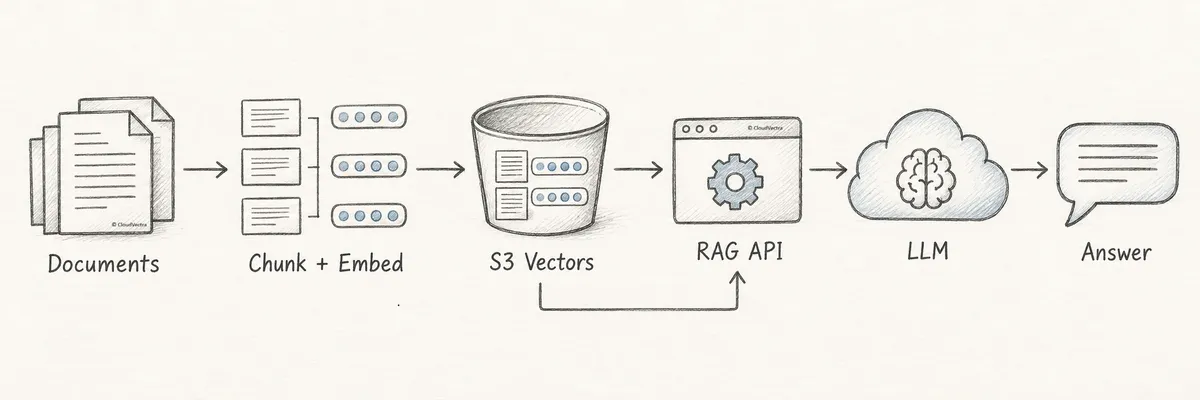
Figure 1 — A deliberately small RAG architecture. Simplicity is valuable only if it still satisfies quality, latency, availability, and security requirements.
1. Amazon S3 remains the source of truth
Original PDFs, Word files, presentations, manuals, policies, support articles, and application documentation remain in regular S3 buckets. Preserve durable identifiers and version information so a retrieved chunk can always be traced back to its source.
2. S3 Vectors stores retrieval-ready records
Each chunk typically produces:
- - a vector embedding;
- - a stable chunk key;
- - filterable metadata such as tenant, department, document type, status, region, or publication date; and
- - optional non-filterable metadata such as the source passage or a display title.
AWS currently supports cosine and Euclidean distance, vectors from 1 to 4,096 dimensions, up to 2 billion vectors per index, and up to 10,000 indexes per vector bucket. Those scale limits are generous, but they do not eliminate the need to choose index boundaries carefully. Index-per-tenant, shared multi-tenant indexes, regional indexes, and hot/cold tiers have different cost, isolation, and throughput characteristics.
3. The application remains the policy and orchestration layer
The API is still responsible for authentication, authorization, query embedding, filter construction, retrieval, optional reranking, prompt assembly, conversation state, citations, and audit logging.
This separation matters. A vector store finds mathematically similar records; it does not decide what a user is entitled to see. Tenant and access attributes should be derived from trusted identity and policy data, not accepted directly from a browser request. Use IAM and bucket policies to restrict service access, and apply authorization-aware retrieval filters as an additional control. For sensitive systems, validate permissions again before returning source content. Metadata filtering is useful for scoping retrieval, but it should not become the only security boundary.
4. The LLM consumes the retrieved context
The LLM provider does not need to know where the vectors came from. The application sends the selected passages, instructions, conversation context, and user question. That makes the vector-store choice largely independent of the generation model and lets teams evaluate it on retrieval quality, latency, scale, features, security, and total cost.
Why metadata pre-filtering changes the decision
Enterprise RAG rarely searches an entire corpus. A question such as “What is the production deployment policy?” may need to search only documents that match:
- - the user’s tenant;
- - the engineering department;
- - an approved policy collection;
- - the production environment;
- - a valid publication window; and
- - the user’s access classification.
On September 30, 2026, AWS announced an ENHANCED index mode for S3 Vectors that evaluates metadata filters before vector similarity search. It also introduced $startsWith for prefix matching on paths, URLs, and hierarchical keys. AWS reports up to five times more matching vectors returned for highly selective filters, with no additional charge and no need to re-ingest data.
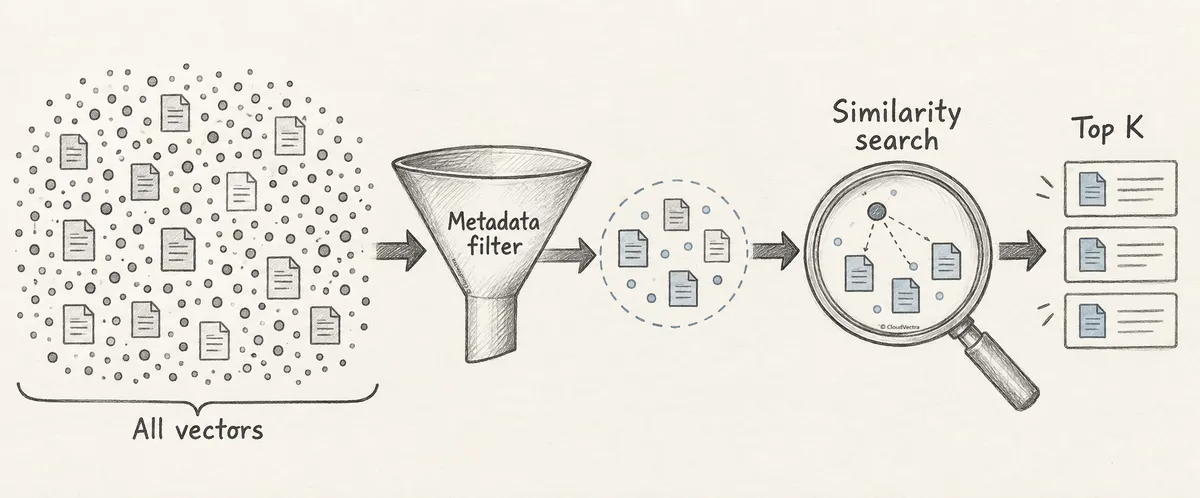
Figure 2 — Pre-filtering narrows the eligible population first, then performs similarity search within that scope.
This distinction is subtle but important. Imagine an index with 100 million chunks, of which only 50,000 belong to the tenant and document class allowed for a request. A post-filter-style process may search for nearest neighbors across the broader space and then reject candidates that fail the filter. If few candidates survive, the result can contain fewer than the requested top K or miss stronger matches within the small eligible subset. Pre-filtering defines the eligible subset first, improving recall when the filter is selective.
A representative filter might look like this:
{
  "$and": [
    { "tenant_id": { "$eq": "customer-123" } },
    { "department": { "$eq": "engineering" } },
    { "document_path": { "$startsWith": "/policies/production/" } },
    { "effective_year": { "$gte": 2025 } }
  ]
}
There is one migration detail teams should not miss: indexes in vector buckets created before September 30, 2026 use CLASSIC mode by default, including new indexes later created in those older buckets. AWS recommends testing an existing index with per-query ENHANCED mode, then using UpdateIndexMode after validation. Buckets created on or after that date default to ENHANCED.
Also interpret the “5×” claim precisely. It is not a promise of five-times-better end-user answers, five-times-lower latency, or five-times-lower cost. It describes improved recall for highly selective filtered searches. End-to-end answer quality still depends on chunking, embeddings, filters, top K, reranking, prompt construction, and the generation model.
How S3 Vectors is priced—and what actually moves the bill
The S3 Vectors price model has four practical levers:
Monthly vector cost
  = storage
  + vector writes and deletes
  + query request charges
  + query data processed
  + query data returned
  + data transfer and surrounding application costs
Query data processed depends on index size and the average size of each vector record, including the vector, key, and filterable metadata. Non-filterable metadata is excluded from query-processing calculations, although returning metadata can contribute to data-returned charges. Large results are paginated, and returning thousands of candidates can add cost even if the final prompt uses only a handful.
Several design choices therefore have direct economic consequences:
- Vector dimensions. A larger embedding consumes more storage and increases the data footprint processed by queries. Do not assume that the largest available embedding produces the best business outcome; test accuracy per dollar.
- Index boundaries. Query-processing cost is influenced by how many vectors sit in the queried index. Separating independent tenants, regions, or corpora can reduce the search population and improve isolation, but too many tiny indexes add lifecycle and routing complexity. AWS also recommends distributing vectors across indexes when useful for query performance.
- Metadata classification. Keep only fields used in predicates as filterable metadata. Large text passages, display descriptions, and other return-only content can be designated non-filterable when the access pattern permits. That classification must be planned when the index is created because non-filterable metadata keys cannot later be changed in place.
- Batching and churn. S3 Vectors supports batching up to 500 vectors in a
PutVectorsrequest. Small writes may pay minimum request sizes, and overwritten or deleted vectors can remain in billable storage for up to a day while space is reclaimed. High-churn workloads deserve a dedicated cost test. - Candidate count. S3 Vectors can return up to 10,000 nearest neighbors per query, which is useful for multi-stage retrieval and reranking. It is not a reason to retrieve 10,000 results by default. Fetch only the candidate pool that materially improves quality.
In June 2026, AWS reduced query data-processing charges by up to 80% for portions of indexes above 10 million vectors. That makes large-scale use more attractive, but it does not automatically make one giant index the best design: isolation, throughput, selective access patterns, and performance still matter.
When S3 Vectors is a strong candidate
S3 Vectors deserves a serious benchmark when most of the following are true.
Semantic similarity is the core retrieval operation
The primary path is query embedding → nearest-neighbor search → top-K chunks, perhaps followed by reranking. The system does not depend heavily on advanced lexical operators or search-engine relevance tooling.
Metadata is compact and central to retrieval
Tenant, document type, department, status, region, and date fields fit comfortably within the current limits: up to 50 metadata keys per vector, 2 KB of filterable metadata, 40 KB of total metadata, and 100 filter constraints per query.
Sub-second vector retrieval is acceptable
AWS documents cold-query response times below one second and warm performance as low as roughly 100 milliseconds. That can work well for enterprise chat, where embedding, application processing, LLM time-to-first-token, and generation often dominate the experience. It is not equivalent to a guarantee for every index and access pattern; measure p50, p95, and p99 under realistic concurrency.
Traffic is intermittent, variable, or modest
Usage-based infrastructure is attractive when an internal assistant is busy during business hours and nearly idle overnight, or when demand is unpredictable. Removing an always-on cluster can matter more than optimizing a small per-query difference.
The corpus is large or long-lived
S3 Vectors is designed for billion-vector scale and can be especially compelling for embeddings retained over long periods. It can also serve as a lower-cost retrieval tier while a faster search engine holds the hottest subset.
The team values operational simplicity
No nodes, shards, or replicas need to be provisioned for S3 Vectors itself. The application still needs monitoring, retry logic, ingestion controls, backup and recovery thinking, and access governance, but there is less database infrastructure to operate.
When it is not the right replacement
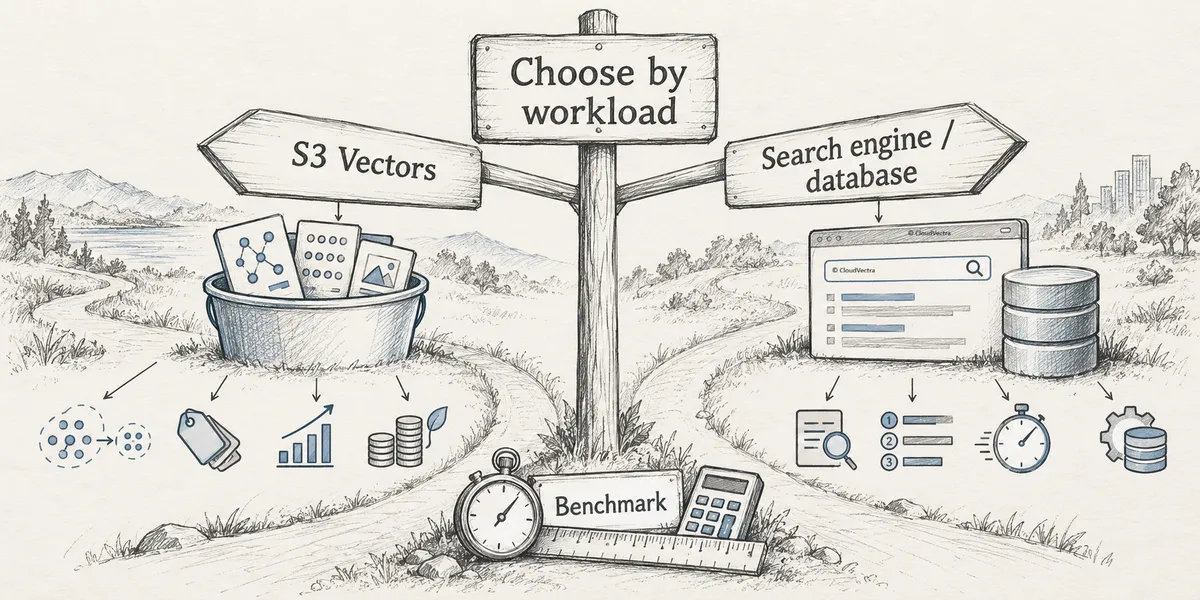
Figure 3 — Choose by workload. Cost is one criterion alongside retrieval behavior, latency, application state, and operational requirements.
You need a full search engine
If the product relies on BM25, fuzzy matching, faceting, aggregations, field weighting, analyzers, stemming, typo tolerance, advanced Boolean queries, or carefully tuned hybrid lexical-plus-vector ranking, OpenSearch or another search platform may remain the better fit. S3 Vectors is a vector service, not a drop-in replacement for a complete search engine.
You need consistently ultra-low latency or very high throughput
AWS says an index can support hundreds of query, get, or list operations per second and recommends distributing vectors across indexes when appropriate. That may be ample for an internal assistant and insufficient for a high-volume consumer search surface. Systems with strict tail-latency objectives or large concurrency spikes should benchmark against in-memory and provisioned alternatives.
Your operational database owns real application state
DocumentDB or another database may manage document versions, workflows, users, permissions, relationships, audit state, and transactions in addition to embeddings. Moving vectors does not replace those responsibilities. A clean separation can be more sensible:
S3                 → original documents
Operational DB     → versions, permissions, workflow, application state
S3 Vectors         → embeddings and retrieval metadata
If the database’s only meaningful role is storing vectors and duplicated chunk metadata, however, it may be removable.
The metadata model exceeds vector-record limits
Complex nested entities, joins, frequently changing authorization graphs, or metadata larger than current S3 Vectors limits belong elsewhere. Store a compact retrieval projection with the vector and keep the authoritative model in the operational system.
You require search-engine features around observability or relevance operations
Mature search teams often depend on query explanations, custom scoring, analyzers, dashboards, index aliases, or operational tooling. The cost of rebuilding those capabilities in application code can erase the savings from a simpler vector store.
A practical fit matrix
| Workload characteristic | Likely direction |
|---|---|
| Semantic nearest-neighbor search is the primary retrieval method | Strong S3 Vectors candidate |
| Selective tenant, path, status, or date filters | Strong candidate with ENHANCED mode |
| Variable traffic and a costly always-on cluster | Strong candidate |
| Large, durable vector corpus with moderate query frequency | Strong candidate |
| Sub-second retrieval is acceptable | Candidate; benchmark tail latency |
| Heavy BM25, fuzzy, faceted, or hybrid search | Keep or evaluate a search engine |
| Consistent sub-10-ms retrieval is mandatory | Benchmark specialized or in-memory options |
| Rich application data, relationships, or transactions | Keep an operational database |
| Complex, rapidly changing authorization graph | Keep policy data outside the vector record; enforce separately |
| Hot and cold retrieval patterns differ sharply | Consider a hybrid tiered architecture |
What about ElastiCache?
Caching can help, but only when the workload offers something reusable. “Put Redis in front of it” is not a strategy until the team can name the cached object, its validity rules, and its observed hit rate.
Possible cache targets include:
- - query embeddings for repeated normalized questions;
- - retrieval results for stable corpora and repeatable authorization scopes;
- - final answers when freshness and personalization constraints allow;
- - conversation or session state; and
- - frequently read application metadata.
Each has a different cache key and invalidation problem. Caching retrieval results across tenants or permission scopes can create a security defect if identity context is omitted from the key. Caching final answers can return stale material after a policy changes. Query embeddings are safer but may save little if embedding cost and latency are already small.
Measure four numbers before adding or retaining a cache: hit rate, latency saved on a hit, invalidation cost, and total monthly cache cost. If a cache produces a 3% hit rate and removes 80 milliseconds from only those requests, it may add more operational complexity than user value.
How to modernize without betting the application
Do not begin with “replace everything.” Begin with an evidence map.
Step 1: inventory responsibilities and duplication
For every service, document what it stores, what queries it serves, its availability requirement, its monthly cost, and who operates it. Identify duplicate vectors, chunks, source files, and metadata. Separate “required for the product” from “convenient during the prototype.”
Step 2: characterize the workload
Capture:
- - document, chunk, and vector counts;
- - embedding dimensions and average record size;
- - ingestion and deletion rates;
- - queries per day and peak queries per second;
- - filter selectivity by tenant and document class;
- - requested and ultimately used top K;
- - current p50, p95, and p99 latency;
- - cache hit rate;
- - current retrieval relevance and answer-quality scores; and
- - availability, recovery, and data-residency requirements.
Average latency and average daily traffic are not enough. Architectures usually fail at the tail or during bursts.
Step 3: build a shadow index with representative data
Use the same embedding model, chunk keys, and metadata semantics as the existing system. Replay a representative query set, including common questions, rare topics, selective tenant filters, typo-heavy queries, newly ingested documents, and adversarial authorization cases.
Step 4: compare retrieval quality, not just speed
Track recall@K, precision@K, mean reciprocal rank, normalized discounted cumulative gain, empty-result rate, and citation correctness where applicable. Add human review for business-critical questions. A lower-cost service that retrieves the wrong policy is not an optimization.
Step 5: measure end-to-end economics
Include vector storage, writes, query processing, returned data, application compute, network transfer, observability, cache, migration effort, and operator time. Then include LLM input and output tokens. A retrieval change that removes one database but doubles prompt context may merely move cost downstream.
Step 6: test failure and freshness behavior
Verify retry behavior, throttling, access denial, document deletion, index-update visibility, recovery procedures, and re-embedding workflows. S3 Vectors writes are strongly consistent, but application pipelines can still create stale or orphaned records if document and vector updates are not coordinated.
Step 7: migrate gradually
Run shadow queries, compare results, and route a small percentage of production traffic before removing the old platform. Define rollback criteria in advance. Decommission infrastructure only after quality, latency, security, and operational targets hold under real traffic.
Optimize the whole RAG pipeline
The cheapest vector store cannot rescue an inefficient pipeline. Total RAG cost is shaped by:
Source documents
      ↓
Parsing and chunking
      ↓
Embedding generation
      ↓
Vector storage and retrieval
      ↓
Metadata filtering
      ↓
Candidate reranking
      ↓
Context selection
      ↓
LLM input + output tokens
Oversized chunks can reduce retrieval precision and waste input tokens. Tiny chunks can lose context and increase vector count. Excessive top K inflates reranking and prompt costs. Weak metadata allows irrelevant candidates into the ranking stage. The best design tunes these together.
A useful optimization sequence is:
- 1. define answer-quality and citation targets;
- 2. test chunking and embedding strategies;
- 3. use trusted metadata to narrow the eligible corpus;
- 4. retrieve a candidate set large enough for recall but no larger than necessary;
- 5. rerank only when it improves measured quality;
- 6. send the smallest sufficient context to the LLM; and
- 7. select the least expensive infrastructure that meets the resulting service-level objectives.
This is often where the largest savings appear: fewer irrelevant chunks improve retrieval quality while also reducing token consumption.
A production signal: MIXI’s FamilyAlbum
S3 Vectors is not limited to small RAG pilots. In a September 29, 2026 case study, AWS described how MIXI used the service for natural-language search across FamilyAlbum, whose users had shared more than 20 billion photos and videos as of January 2026. MIXI reported roughly 75% lower vector storage and management costs, consistent sub-one-second search, and simpler operations.
That result should be treated as a case study, not a universal savings estimate. Still, it demonstrates the architectural pattern at substantial scale: large, durable vector collections can benefit when storage economics and managed operations matter more than search-engine breadth or ultra-low latency.
The decision in one sentence
Use S3 Vectors when your retrieval problem is fundamentally “find semantically similar items within a compact, metadata-defined scope,” sub-second performance is acceptable, and removing provisioned infrastructure creates meaningful savings.
Keep—or combine it with—a search engine, operational database, or cache when those systems provide capabilities the workload genuinely uses.
The best RAG architecture is not the one with the fewest boxes, nor the one with the newest service. It is the one that delivers the required relevance, latency, isolation, availability, and scale at the lowest defensible total cost.
Note: Product capabilities and limits in this article were verified against AWS documentation on October 1, 2026. Cloud services and prices change; validate the current documentation and benchmark with your own data before making an architecture decision.
Technical references
- Amazon S3 Vectors introduces metadata pre-filtering
- AWS News Blog: Metadata pre-filtering and
ENHANCEDmode - Amazon S3 Vectors: changing a vector index’s mode
- Amazon S3 Vectors limitations and restrictions
- Amazon S3 Vectors best practices
- Amazon S3 pricing: S3 Vectors
- AWS announcement: query charge reductions for large indexes
- AWS Storage Blog: How MIXI built natural-language search over billions of photos
Optimize your AI and RAG workloads with confidence
CloudVectra Professional Services helps engineering and FinOps teams assess RAG architecture, cloud infrastructure, vector search, caching, and LLM usage to identify practical cost and performance improvements.